
If you’ve ever found yourself standing in front of your garage door, entering your code only to be greeted by silence or a blinking keypad, you know how frustrating it can be. Garage door keypads are a handy way to access your garage without a remote or key, but they sometimes need to be reset—especially when you forget your code, move into a new home, or want to update security. Resetting a garage door keypad may sound complicated, but it’s something you can do yourself with a little patience and the right guidance.
In this article, you’ll learn everything about how to reset a garage door keypad, even if you have little technical experience. You’ll discover why resets are sometimes needed, how different brands and models approach the process, and step-by-step instructions to get your keypad working again. Along the way, you’ll find out why some common mistakes can leave you locked out and what to do when things don’t go as planned. Whether you have a LiftMaster, Chamberlain, Genie, or another brand, this guide will help you regain control of your garage access with confidence.
Why Resetting A Garage Door Keypad Matters
Resetting your garage door keypad isn’t just about fixing a forgotten code. It’s also an important part of keeping your home secure. When you move into a new house, there’s no way to know who might have the old code. If you share your code with a neighbor or contractor, you may want to change it later for peace of mind. Sometimes, your keypad might act up due to low batteries, interference, or aging electronics, and a reset is the simplest way to restore normal function.
A well-maintained keypad also saves you from unnecessary stress. You won’t have to worry about getting locked out or fumbling with a remote in the dark. For families with kids or frequent visitors, updating the code ensures only trusted people can enter.
Types Of Garage Door Keypads And How They Work
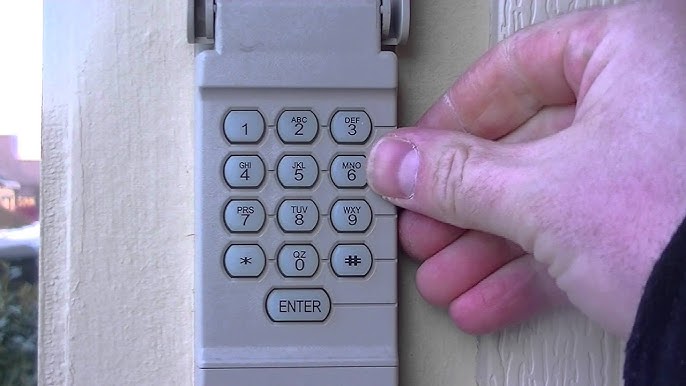
Before diving into the reset process, it’s helpful to know that not all keypads are the same. Most modern keypads are wireless, using a radio signal to communicate with your garage door opener. Some older systems are wired, but these are less common today. The keypad itself is usually mounted just outside your garage, near the doorframe.
Keypads work by matching a code you enter to a code stored in the opener’s memory. When the codes match, the opener activates the door. If the code is changed on the keypad, you may also need to update the opener’s memory to accept the new code.
There are several popular brands, and each has its own way of resetting:
- LiftMaster and Chamberlain: Often share similar technology and reset steps.
- Genie: Uses a slightly different process and keypad design.
- Craftsman: Typically follows the LiftMaster method, as many openers are made by the same company.
- Other brands (Linear, Overhead Door, etc.) Have their own approaches.
Knowing your keypad’s brand is the first step in the reset process. If you don’t have the manual, look for the brand name on the keypad or opener motor.
When You Should Reset Your Garage Door Keypad
There are several situations where a reset is not just helpful but essential:
- Forgotten Code: The most common reason. If you or your family can’t remember the code, a reset is the only solution.
- New Homeowners: If you’ve moved into a new place, you can’t be sure who knows the old code.
- Security Concerns: If you suspect someone else knows your code, change it immediately.
- Malfunctioning Keypad: If the keypad isn’t responding or the door opens and closes on its own, a reset can clear up glitches.
- Battery Replacement: Sometimes, after changing the battery, the keypad may need to be reprogrammed.
Resetting is a simple but powerful way to maintain your garage’s security and convenience.
Tools And Preparation: What You’ll Need
Resetting a garage door keypad does not require special tools, but it’s good to have a few items ready:
- Step ladder: Most garage door opener units are mounted on the ceiling.
- Flashlight: Helps you see the opener’s buttons clearly, especially in low light.
- Small screwdriver: For opening battery covers or keypad cases.
- New batteries: If you suspect the keypad battery is weak.
- Pen and paper: To note down new codes.
- User manual: If available, for brand-specific steps.
Be sure to check the batteries first. Weak or dead batteries are a common cause of keypad problems and can make resetting impossible.

How To Reset A Garage Door Keypad: Step-by-step Guide
Resetting a garage door keypad is mostly about following the right sequence. Here’s a general process that fits most keypads, with notes on brand differences.
Step 1: Identify Your Garage Door Opener Brand And Model
- Look for the brand name on the keypad or the main opener unit.
- Find the model number if possible (often on a sticker).
- If you have the user manual, keep it nearby.
Step 2: Locate The “learn” Or “program” Button
- The “Learn” button is usually on the back or side of the opener motor unit.
- You may need to remove a light cover to see it.
- The button might be yellow, red, orange, green, or purple, depending on the brand.
Common “learn” Button Colors And Their Meaning
| Brand | Learn Button Color | Frequency (MHz) | Typical Manufacturing Year |
|---|---|---|---|
| LiftMaster / Chamberlain | Yellow | Security+ 2.0 (315/390) | 2011 – Present |
| LiftMaster / Chamberlain | Red/Orange | 390 | 1997 – 2005 |
| Genie | Black/White | 315/390 | Varies |
Step 3: Clear The Old Code (if Needed)
Some keypads let you clear the old code before adding a new one. Here’s a typical method:
- Press and hold the “Learn” button on the opener unit for 6-10 seconds until the indicator light turns off. This erases all codes from the opener’s memory.
- Release the button. Wait a few seconds before proceeding.
- Note: This will clear ALL remotes and keypads. You’ll need to reprogram them.
Non-obvious tip: If you want to keep existing remote controls working, do not hold the “Learn” button too long. A short press is enough for most keypads to learn a new code without erasing remotes.
Step 4: Enter Programming Mode On The Keypad
- On most keypads, press the “Program” or “Learn” button, or a special sequence (like holding down the “#” and “8” keys).
- Some keypads have a small “reset” hole you can press with a paperclip.
Check your manual or the keypad’s back for instructions. For some Genie keypads, you hold the “Program” button until the LED flashes.
Step 5: Set A New Code
- Enter your desired new PIN (usually 4 digits).
- Press the “Enter” button (or whatever key is specified).
- The keypad may blink, beep, or flash to confirm.
Pro tip: Avoid using simple codes like “1234” or your address for better security.
Step 6: Sync The Keypad With The Opener
- Quickly press and release the “Learn” button on the garage opener motor.
- Within 30 seconds, go to the keypad and enter your new PIN, then press “Enter.”
- The opener light should blink or click, confirming the code is accepted.
If you wait too long after pressing the “Learn” button, you’ll need to repeat the process.
Step 7: Test The Keypad
- Go outside and enter the new code.
- The door should open or close.
- If not, repeat the steps, making sure you pressed the right sequence.
Step 8: Reprogram Other Devices (if Needed)
If you cleared the memory, you’ll need to add all remotes and other keypads again. Follow the same “Learn” process for each device.
Brand-specific Reset Instructions
While the general process is similar, each brand has its own steps. Here are detailed instructions for the most common brands.
Liftmaster And Chamberlain
- Locate the Learn button on the opener motor.
- Press and release the Learn button. The indicator light will turn on.
- Within 30 seconds, enter your new 4-digit code on the keypad, then press Enter.
- The opener light will blink to confirm.
- Test the code.
Tip: For older keypads, you may need to press the Enter button twice or use a different key sequence.
Genie
- Slide the keypad cover open.
- Press and hold the Program button until the LED blinks.
- Enter your new PIN, then press Program again.
- Go to the opener motor, press the Learn button once.
- Within 30 seconds, enter your PIN on the keypad, then press Up/Down.
- The opener should activate.
Non-obvious insight: Genie keypads sometimes require you to hold the keys longer for the reset to work. Be patient with each step.
Craftsman
- Find the Learn button on the opener.
- Press and release the Learn button.
- Enter your new PIN on the keypad, then press Enter.
- The opener light should blink or click.
Since Craftsman openers are often made by the same company as LiftMaster/Chamberlain, the steps are nearly identical.
Linear, Overhead Door, And Other Brands
- Locate the programming or reset button (may be inside the keypad or on the opener).
- Follow the manual’s instructions for entering programming mode.
- Set a new PIN as directed.
- Sync with the opener using its Learn button.
If your keypad does not have a brand name, search for a model number inside the battery compartment or on the back.
What To Do If Your Keypad Won’t Reset
Sometimes, even after following every step, the keypad still won’t work. Here are some troubleshooting tips:
- Check the batteries: Weak batteries are the most common cause of problems.
- Clean the keypad: Dirt or moisture can block the buttons.
- Check for interference: Wireless devices or nearby electronics can disrupt the signal.
- Reset again: Go through the steps slowly, making sure you press the right buttons.
- Inspect for damage: Cracked buttons or faded numbers can make entry difficult.
- Consult the manual: Look up your model for any special reset instructions.
- Replace the keypad: If all else fails, it may be time for a new one.
Expert advice: Some keypads have a lockout feature that activates after repeated wrong codes. Wait a few minutes, then try again.
Common Mistakes To Avoid
Resetting a garage door keypad is simple, but mistakes can cost you time and frustration. Here are errors to watch out for:
- Holding the Learn button too long: This erases all remotes and keypads, not just the one you want to reset.
- Waiting too long between steps: Most openers only give you 30 seconds to enter the new code after pressing “Learn.”
- Using a weak PIN: Codes like “1111” are easy to guess and put your security at risk.
- Forgetting to test the code: Always check that the new code works before closing up your tools.
- Not updating all keypads/remotes: If you have more than one keypad or remote, make sure they all work after a reset.
Non-obvious tip: Write down your new code and store it in a safe place, but never leave it in your car or garage where a burglar might find it.
Upgrading To A Smart Garage Door Keypad
If your keypad is old, unreliable, or hard to reset, consider upgrading to a modern smart garage keypad. These let you change codes with a smartphone app, set temporary PINs for guests, and monitor activity from anywhere.
Comparison: Traditional Vs. Smart Garage Keypads
| Feature | Traditional Keypad | Smart Keypad |
|---|---|---|
| Programming Method | Manual buttons, Learn button | Mobile app, remote web access |
| Temporary PINs | No | Yes |
| Security Alerts | No | Yes |
| Installation | Easy | May require Wi-Fi setup |
| Price | Lower ($20–$40) | Higher ($50–$120+) |
If you want more control and security, a smart keypad is a great investment.
How To Maintain Your Garage Door Keypad
A well-maintained keypad will work reliably for years. Here’s how to keep it in top condition:
- Change batteries regularly—at least once a year or whenever the keypad starts acting up.
- Clean the buttons with a soft cloth. Avoid using water or harsh chemicals.
- Check for weather damage. Sun, rain, and snow can wear out keypads over time.
- Test the code monthly to make sure everything works, especially before vacations or storms.
- Update the code if you share it with anyone outside your household.
Insider insight: Cover your keypad with a small awning or weather cover to extend its life and keep it readable.
Safety And Security Tips
Your garage is often a main entry point to your home. Keep these security tips in mind:
- Choose a unique code: Avoid birthdays, addresses, or repeating numbers.
- Change codes regularly: Every 6-12 months, or after guests have had access.
- Never share your code widely**: Only give it to trusted family or friends.
- Lock the door from the garage to the house: Adds a layer of security if someone does get your code.
- Consider adding a camera over the garage entry for extra peace of mind.
Resetting Wired Keypads: What’s Different?
Some older garages use wired keypads, connected directly to the opener. The reset process is similar but usually requires:
- Turning off power to the opener.
- Opening the keypad case with a screwdriver.
- Pressing a small reset switch inside, or disconnecting and reconnecting the wires.
- Reconnecting power and reprogramming as above.
Caution: Always cut power before opening electrical devices.
When To Call A Professional
Sometimes, DIY just isn’t enough. Call a garage door professional if:
- The keypad is physically broken or water-damaged.
- You suspect wiring problems.
- The opener won’t accept any new codes.
- You feel uncomfortable working on ladders or electrical devices.
A technician can quickly diagnose and fix issues you might miss.
Additional Resources For Homeowners
If you want to read more, the official manuals from your opener’s manufacturer are often available online. For in-depth troubleshooting and safety tips, you can visit the Family Handyman website, which offers reliable, step-by-step guides.
Frequently Asked Questions
How Often Should I Change My Garage Door Keypad Code?
It’s wise to change your code every 6 to 12 months, especially if you’ve shared it with guests or service workers. If you suspect someone else knows your code, change it immediately for safety.
Can I Reset My Keypad Without The User Manual?
Yes. Most keypads follow similar steps: press the “Learn” button on the opener, then enter a new code on the keypad. If you have trouble, check the brand’s website for a digital manual or look for instructions inside the keypad’s battery compartment.
What Do I Do If The Keypad Still Doesn’t Work After Resetting?
First, replace the batteries. Clean the keypad and check for any visible damage. Make sure you’re following the exact reset steps for your brand and model. If it still fails, the keypad may need replacing or a professional’s help.
Is It Safe To Use The Same Code For Multiple Family Members?
Yes, but only share the code with trusted people. If many people know the code, change it more often. For extra security, use a smart keypad that allows unique codes for each person.
Can Someone Hack My Garage Door Keypad?
Modern keypads use rolling codes and encryption, making hacking very difficult. However, using a weak or common code can make guessing easier. Always choose a strong, unique code and change it regularly.
Resetting your garage door keypad is one of the simplest ways to keep your home secure and your daily life convenient. With these steps, tips, and brand-specific instructions, you’ll be able to handle any keypad issue with confidence—no need to call in the pros unless you really need to. A little time and attention now can save you hassle and worry for years to come.