
Resetting your Liftmaster garage door remote may sound technical, but with the right steps and a little patience, anyone can do it. Whether your remote has stopped working, you’ve bought a new one, or you’re worried about security, knowing how to reset and reprogram your Liftmaster garage door remote is a valuable skill for any homeowner. Garage doors are one of the most-used entry points in American homes, and a malfunctioning remote can disrupt your daily routine or even pose a security risk.
Many people do not realize how much technology has changed in garage door openers. Modern Liftmaster systems use rolling codes, smart features, and advanced safety protocols. But even with these upgrades, remotes can lose synchronization, get wiped during power outages, or simply wear out after years of use.
Resetting your remote is the fastest way to restore reliable access and peace of mind.
This guide will walk you through every step, from understanding the basics to advanced troubleshooting. You’ll also learn how to deal with special situations, like lost remotes or connecting to smart home systems. By the end, you’ll feel confident handling any Liftmaster remote reset, even if you have never opened a garage door opener before.
Understanding Liftmaster Garage Door Remotes
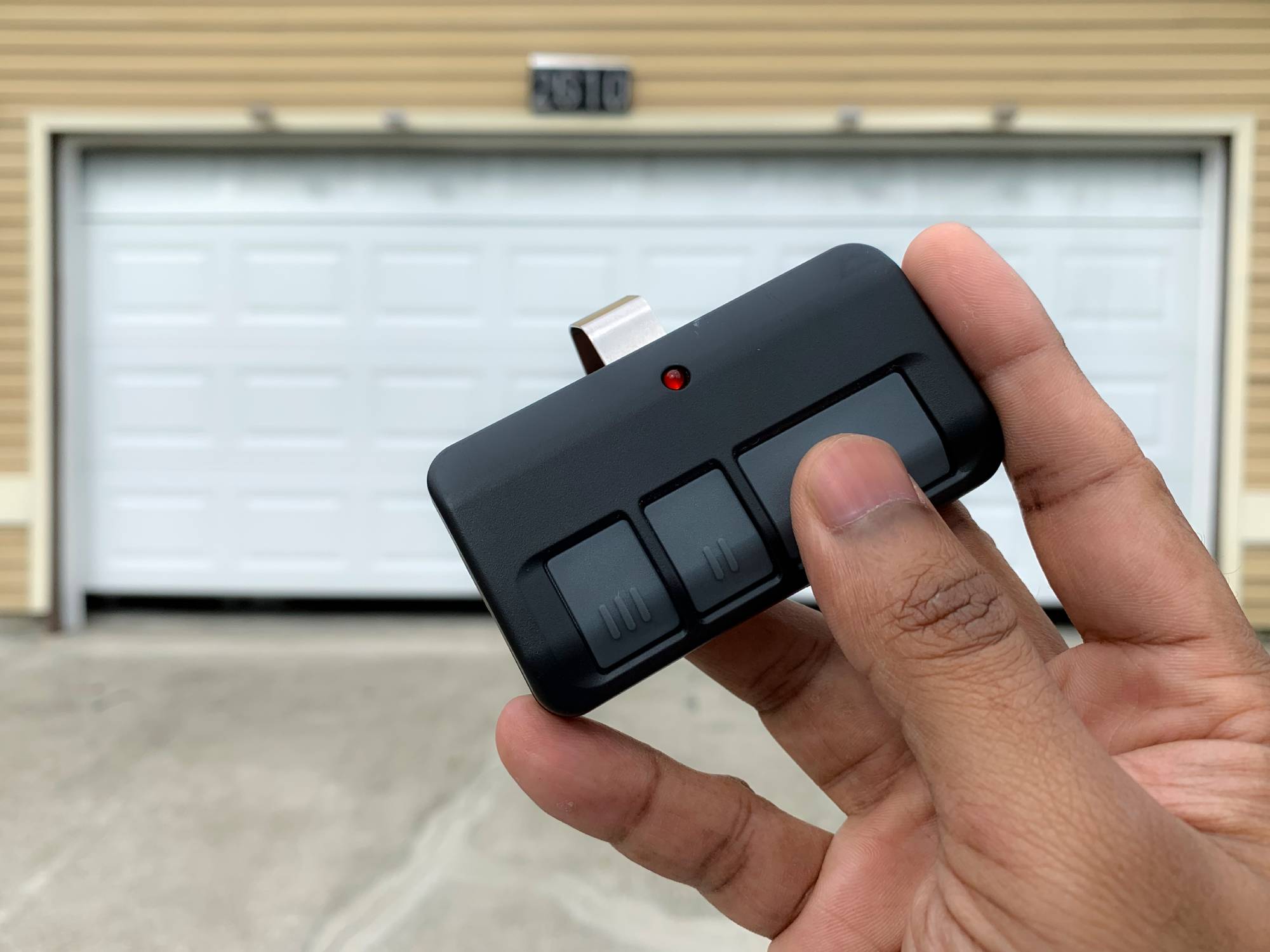
Liftmaster is one of the most recognized brands in garage door openers. Their remotes come in several types, including single-button, multi-button, keychain, and even wireless keypad models. Each type works by sending a coded signal to the garage door opener, telling it to open or close.
What makes modern Liftmaster remotes more secure is the use of rolling code technology. This means the code changes every time you use the remote, making it difficult for someone to copy or “hack” the signal. However, this also means that remotes and openers need to stay synchronized. If the codes get out of sync, a reset is necessary.
Liftmaster remotes use radio frequencies, usually 315 MHz or 390 MHz, depending on the model and year. Knowing your remote type and frequency helps you follow the right reset steps, as older and newer models may differ.
Why You Might Need To Reset Your Liftmaster Remote
There are several reasons you might need to reset your garage door remote:
- Lost or stolen remote: If someone takes your remote, resetting prevents them from accessing your garage.
- New remote programming: When adding a new remote, you must sync it with your opener.
- Malfunctioning or unresponsive remote: Sometimes, the remote stops working due to interference, battery issues, or lost signal sync.
- Security upgrades: After moving into a new home or after service, a reset ensures only your remotes work.
- Clearing old codes: If you have old remotes you no longer use, resetting clears their codes from the opener’s memory.
Many people do not realize that simply changing the battery will not reset or reprogram the remote. You must follow the steps for your specific opener model.
Safety Precautions Before Resetting
Resetting a garage door remote is usually safe, but it’s important to follow some basic precautions:
- Make sure the garage door area is clear of people and objects.
- Do not stand directly under the door while testing the remote.
- If you have a wall control panel, let everyone in the household know you are resetting remotes, so no one operates the door unexpectedly.
- If you use a ladder to reach the opener, ensure it is stable.
These steps prevent accidental injury or damage.
Identifying Your Liftmaster Opener And Remote Model
Before you start, you need to know exactly which Liftmaster opener and remote you have. This ensures you follow the correct steps and use the right buttons.
- Check the opener unit: Most openers have the model number on the side or back of the motor unit hanging from the garage ceiling.
- Examine the remote: On the back or inside the battery compartment, you’ll find the model number and sometimes the frequency.
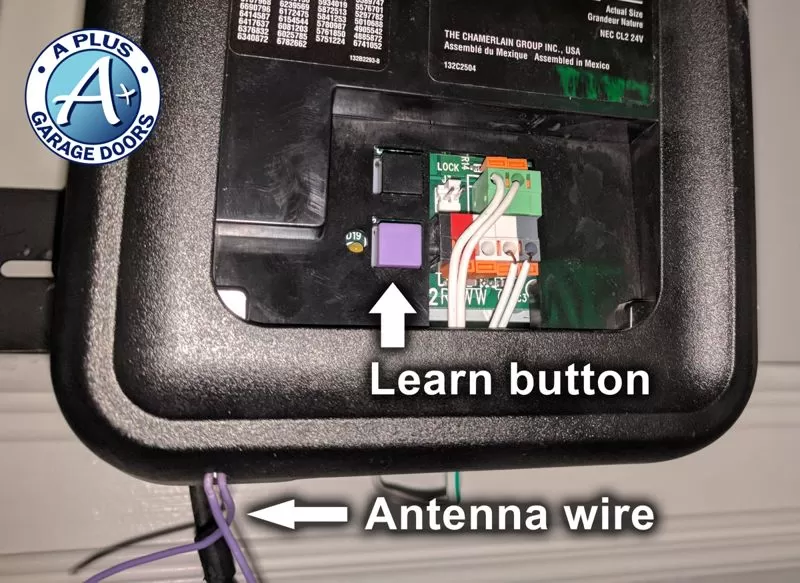
- Note the color of the Learn button: The Learn button color (usually yellow, purple, red/orange, or green) on the opener motor tells you the technology type.
Here’s a quick guide to what the colors mean:
| Learn Button Color | Technology | Remote Frequency | Approximate Year |
|---|---|---|---|
| Yellow | Security+ 2.0 | 390/315 MHz | 2011–Present |
| Purple | Security+ | 315 MHz | 2005–2011 |
| Red/Orange | Security+ | 390 MHz | 1997–2005 |
| Green | Billion Code | 390 MHz | 1993–1997 |
If you are not sure, check your manual or visit the official Liftmaster support page for details.
Step-by-step: How To Reset Your Liftmaster Garage Door Remote
Now, let’s get into the practical steps. The process has two main parts: clearing old codes and programming the remote again.
1. Clearing All Remotes From The Opener’s Memory
If you want to erase all remotes (for example, after losing one or moving into a new home), follow these steps:
- Locate the Learn button on your opener motor unit. You may need a ladder.
- Press and hold the Learn button for about 6–10 seconds. Watch for the indicator light next to the button—it will go out when all remotes are erased.
- Release the button. All remotes and keypads are now wiped from memory.
This step is important for security. Many people forget that remotes can still be programmed to the opener from previous owners or tenants.
2. Programming (re-syncing) Your Remote
After clearing the memory, you need to program your remote again:
- Press and release the Learn button (don’t hold it this time).
- Within 30 seconds, press and hold the button on your remote that you want to program.
- Wait for the opener light to blink (or you may hear a click). This means programming is successful.
- Release the remote button.
Test your remote to confirm that it now operates the garage door.
> Pro Tip: If you have multiple remotes, repeat this process for each one, pressing the Learn button once for each remote.
3. Special Steps For Keyless Entry Pads
If you use a wireless keypad (mounted outside the garage), resetting is similar:
- Clear the memory as above.
- Enter the desired 4-digit PIN on the keypad.
- Press and release the Learn button on the opener.
- Within 30 seconds, enter your PIN on the keypad and press Enter.
- The opener light will blink, confirming success.
4. For Smart Liftmaster Openers (myq, Wi-fi)
Many modern Liftmaster openers use MyQ technology and connect to Wi-Fi or smart home systems. To reset remotes for these openers:
- Use the Learn button to clear remotes as before.
- Use the MyQ app to add or remove remotes and users, following on-screen instructions.
- Sync your remote using the steps in your opener’s manual.
Resetting with smart features can also involve deleting the opener from your MyQ account and re-adding it. This is useful if you change Wi-Fi networks or sell your home.
Troubleshooting Common Problems During Reset
Sometimes, things don’t work as expected. Here’s how to solve common issues:
Remote Still Not Working After Reset
- Check the battery: Weak or dead batteries are the most common cause.
- Interference: Nearby electronics can block signals. Try from a closer distance.
- Outdated remote: Some remotes are not compatible with newer openers.
- Hold the button longer: Some models need a longer button press during programming.
Opener Light Doesn’t Blink
- Make sure you are pressing the Learn button (not another button).
- If the light is burned out, listen for a click sound instead.
- Wait at least 30 seconds between tries to avoid lockout.
Keypad Not Syncing
- Enter the PIN carefully; some models require you to press Enter or Learn twice.
- Reset the keypad by removing and reinserting the battery before trying again.
Multiple Doors Or Remotes
If you have more than one garage door or remote, label each one clearly. This avoids confusion during programming.
Resetting For Security: What Most Owners Miss
Many homeowners do not realize that when you move into a new house, the previous owner’s remotes may still work unless you erase all codes from the opener. This is a common security gap.
It’s also important to reprogram remotes after service visits. Sometimes, technicians use their own remotes for testing and may forget to clear them from memory.
If you have lost a remote, don’t just buy a new one. Always reset the opener to erase the lost remote’s code from memory.
How Resetting Affects Other Devices
Resetting your Liftmaster opener will clear all connected devices, including:
- Car HomeLink buttons
- Wireless keypads
- Additional remotes
- Smart home integrations (MyQ, Alexa, Google Home)
You will need to reprogram each device after a master reset. Failing to do so may leave you locked out or with some remotes not working.
Here’s a comparison of what happens after different types of resets:
| Reset Type | What’s Affected | What to Reprogram |
|---|---|---|
| Erase All Codes | All remotes, keypads, HomeLink, MyQ | Everything (remotes, keypads, smart devices) |
| Single Remote Reprogram | Only selected remote | Just that remote |
| Power Cycle | Usually nothing | Only if settings lost |
Tips For Long-term Remote Reliability
A few smart habits can keep your garage door remote working reliably for years:
- Change batteries every 1–2 years.
- Label your remotes if you have more than one door or opener.
- Store backup remotes in a safe but accessible place.
- Keep the opener manual with your home documents.
- Test your remotes monthly to catch problems early.
- Keep the Learn button covered to prevent accidental erasure.
One non-obvious insight: Temperature extremes (very hot or cold garages) can affect remote batteries and electronics. Store remotes in moderate conditions if possible.
Another detail: If your neighborhood has many garage doors, occasional interference is possible. If your remote works sometimes but not always, check for new devices or neighbors’ openers on the same frequency.
Advanced: Integrating With Smart Home Systems
If you use MyQ or another smart home system, resetting your remote can affect these connections. Here’s what to watch for:
- After a reset, open the MyQ app and re-link the opener.
- If you use HomeLink (built into many cars), you may need to clear the old code from your car and reprogram it.
- For Alexa or Google Home, check device lists and remove the old opener before adding it back.
Many people forget to update smart home integrations after a remote reset, which causes automation routines to fail.
Dealing With Lost, Stolen, Or Broken Remotes
If your remote is lost or stolen:
- Erase all codes from the opener immediately.
- Purchase a compatible replacement remote. Check the model number and frequency.
- Program the new remote using the steps above.
If your remote is broken but not lost, you can safely replace just that remote without a full system reset.
When To Call A Professional
While most people can reset a Liftmaster remote themselves, call a qualified technician if:
- The Learn button is damaged or missing.
- The opener is in a hard-to-reach place.
- You see error codes or blinking lights that won’t clear.
- You have complex smart home integrations.
A professional can also check for wiring, sensor, or safety issues that might prevent remotes from syncing.
Comparing Liftmaster Remotes With Other Brands
Liftmaster is part of the Chamberlain Group, which also makes Chamberlain and Craftsman openers. Many steps are similar between these brands. Here’s how Liftmaster compares to others:
| Brand | Learn Button Colors | Smart Home Support | Security Features |
|---|---|---|---|
| Liftmaster | Yellow, Purple, Red/Orange, Green | MyQ, Alexa, Google | Rolling Code, Security+ 2.0 |
| Chamberlain | Yellow, Purple, Red/Orange, Green | MyQ | Rolling Code, Security+ |
| Genie | Black, Purple, Blue | Aladdin Connect | Intellicode |
| Craftsman | Yellow, Purple, Red/Orange, Green | Some models | Rolling Code |
If you switch brands, you will usually need a new remote and must reprogram everything.
Important Mistakes To Avoid
- Not clearing old codes. If you just program a new remote without clearing memory after a lost remote, old remotes can still open your door.
- Wrong Learn button. Some openers have multiple buttons. Make sure you use the Learn button, not a light or lock button.
- Programming too slowly. You must press the remote button within 30 seconds of the Learn button.
- Mixing frequencies. Older remotes (390 MHz) do not work with newer openers (315 MHz or Security+ 2.0).
- Forgetting keypads or cars. After a reset, you must reprogram wireless keypads and HomeLink systems in vehicles.
Real-world Example: Resetting After Moving In
Imagine you buy a new house, and the previous owner gives you one remote. For safety:
- Clear all codes using the Learn button.
- Buy new remotes (matching the opener’s frequency).
- Program each remote and keypad as needed.
- Reprogram HomeLink in your vehicle.
- Update MyQ app, if used.
This process ensures you are the only one with access to your garage. Many new homeowners skip this, leaving themselves vulnerable.
Frequently Asked Questions
How Do I Find The Learn Button On My Liftmaster Opener?
The Learn button is usually on the back or side of the motor unit hanging from your garage ceiling. You may need to remove a small light cover. The button is often yellow, purple, red/orange, or green. Check your opener’s manual for the exact location.
Can I Reset My Remote Without Erasing All Codes?
Yes, you can program a new remote without erasing all codes by simply pressing the Learn button and syncing only the new remote. However, if a remote is lost or stolen, always erase all codes for security.
Why Does My Remote Still Not Work After Resetting?
Check for dead batteries, signal interference, or compatibility issues. Make sure you press the remote button within 30 seconds of the Learn button. If none of these work, your remote may be broken or incompatible with your opener’s frequency.
How Many Remotes Can I Program To A Liftmaster Opener?
Most modern Liftmaster openers support 5–8 remotes plus 1–2 wireless keypads. Older models may support fewer. Check your opener’s manual for the exact number.
Does Resetting Affect My Smart Home Connections?
Yes, erasing all codes from your opener will disconnect MyQ, HomeLink, and other smart home devices. You will need to re-link these systems after resetting your remotes.
Resetting your Liftmaster garage door remote is a simple task that can prevent security risks and restore daily convenience. By following these steps, you can clear old codes, add new remotes, and solve most common problems without calling a technician.
Remember to update all connected devices and test your remotes regularly to keep your garage secure and reliable. With a little care, your Liftmaster system will serve you well for many years.